How the data is analyzed and visualized for Open Ended Questions?
On the dashboard REPORT PAGE, the text analytics using AI run three different models for the open-ended verbatim --
Summary
The Summary model provides the key insights and highlights for the verbatim in the open-ended question
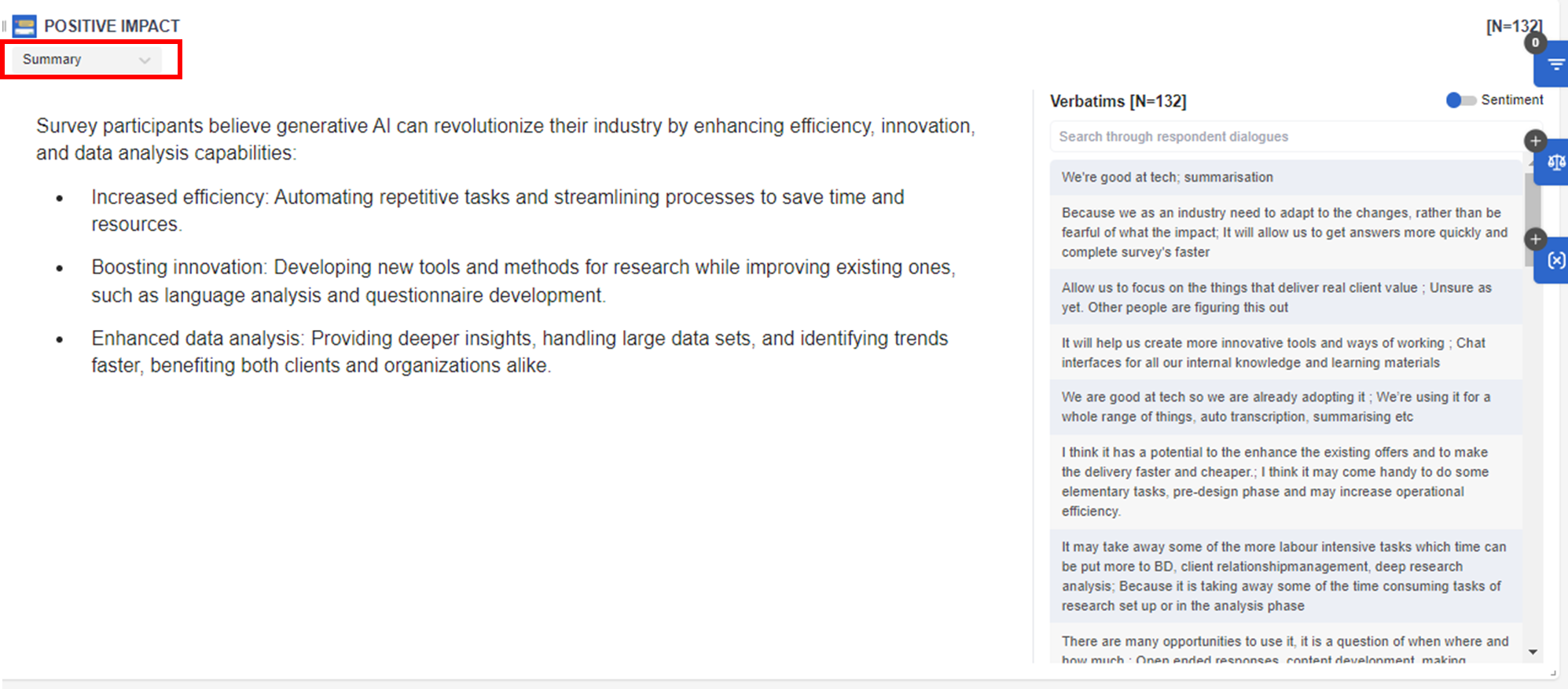
Please note
- The minimum sample size to show the Summary model is n=10.
- The Summary model is NOT responsive to the filter, so it will always show a summary on the total base no matter what filter is on.
Themes
The Themes model provides the themes/topics or codes created in summarizing the verbatim. In the Theme model, we have two extra controls, one is to Enable/Disable Sentiment, another one is to Enable/Disable Netcode. By default, both are enabled, but users can choose to disable any one of them based on their needs.
In this example, it's a question about POSITIVE IMPACT, so all the responses should be positive, to show results by sentiment would not be necessary. In this case, we can choose to Disable Sentiment.
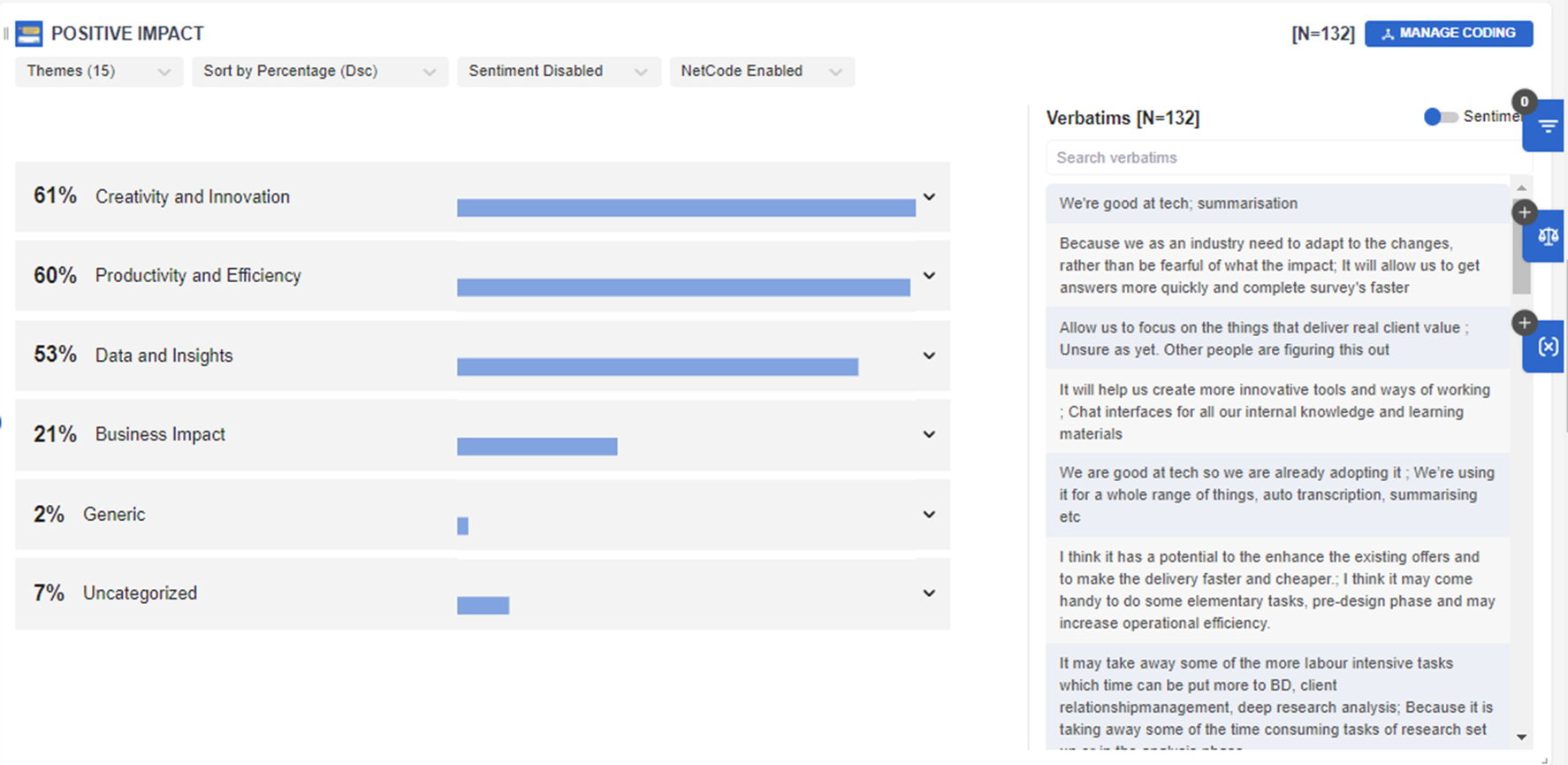
15 themes are created to summarize the verbatim. Leading Netcodes are Creativity and Innovation (61%), Productivity, and Efficiency (60%).
Under the Creativity and Innovation key theme, users can also see the themes or codes that are mentioned under Netcodes such as AI-assisted decision-making (42%) and improved content creation (35%), While 31% mentioned anything about Enhanced creativity.
Users can click the theme or code to filter the relevant verbatim that relates to the theme or code in the verbatim sidebar on the right.
Users can also sort the % by descending or ascending order.
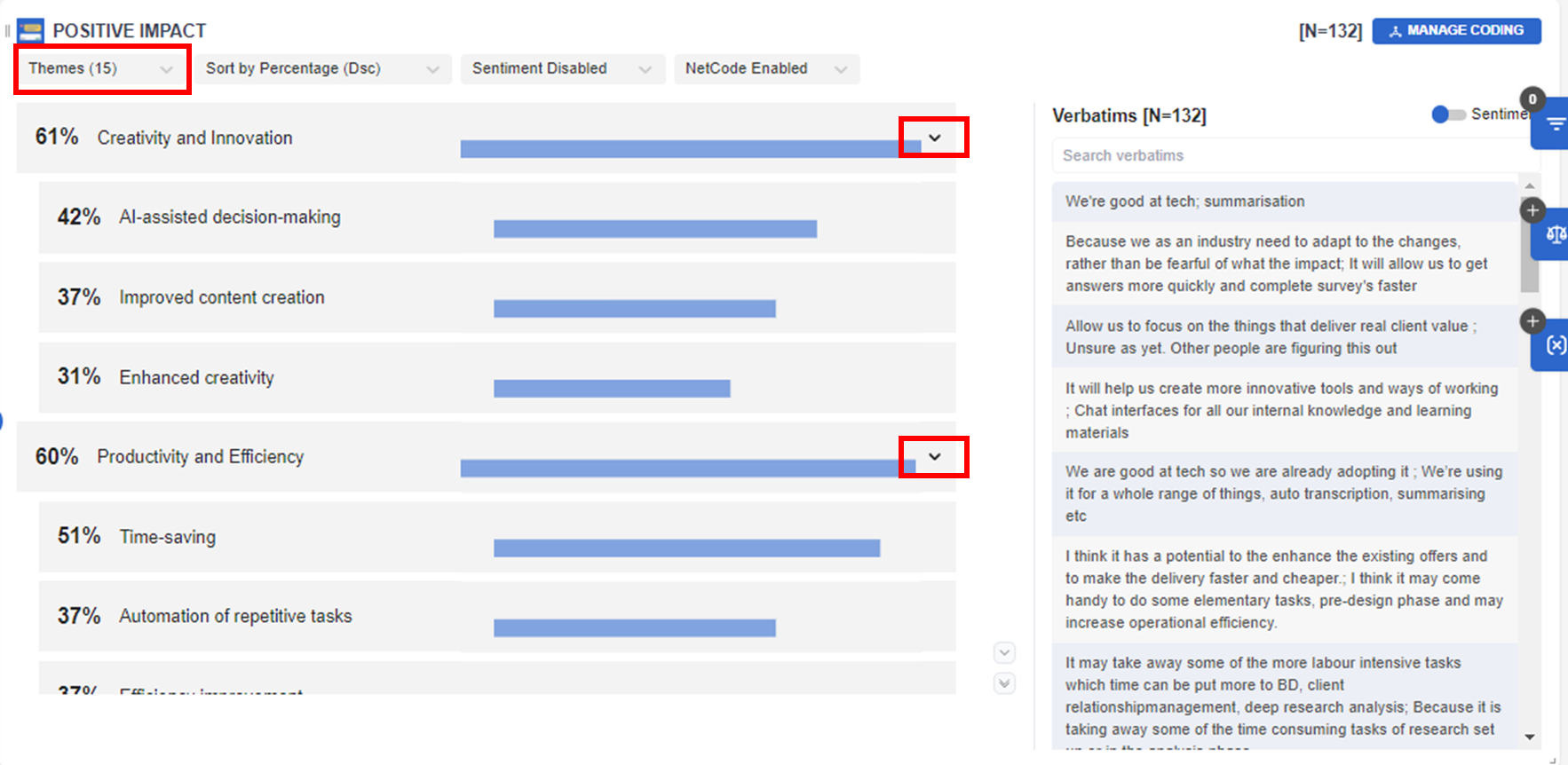
By clicking the arrow in the Netcode, users can select to show or not show the themes or codes
Sample illustration of NetCode only:
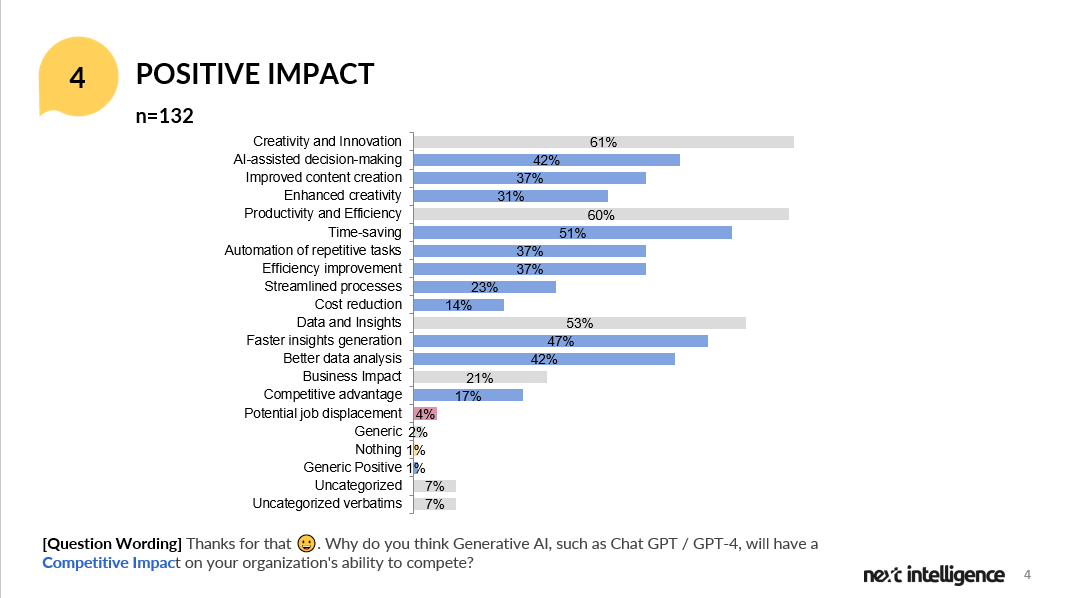
When downloading the PowerPoint results, users can view the results in a bar chart (arranged in descending or ascending order) with combined results for NetCodes as well as the themes or codes.
Please note
- The minimum sample size to show the Theme model is n=50.
- If you need to modify (i.e.add/remove/edit/merge)the current themes or codes you can do so by using the inca AI coding tool. To learn more about this tool, click this article here.
Keywords
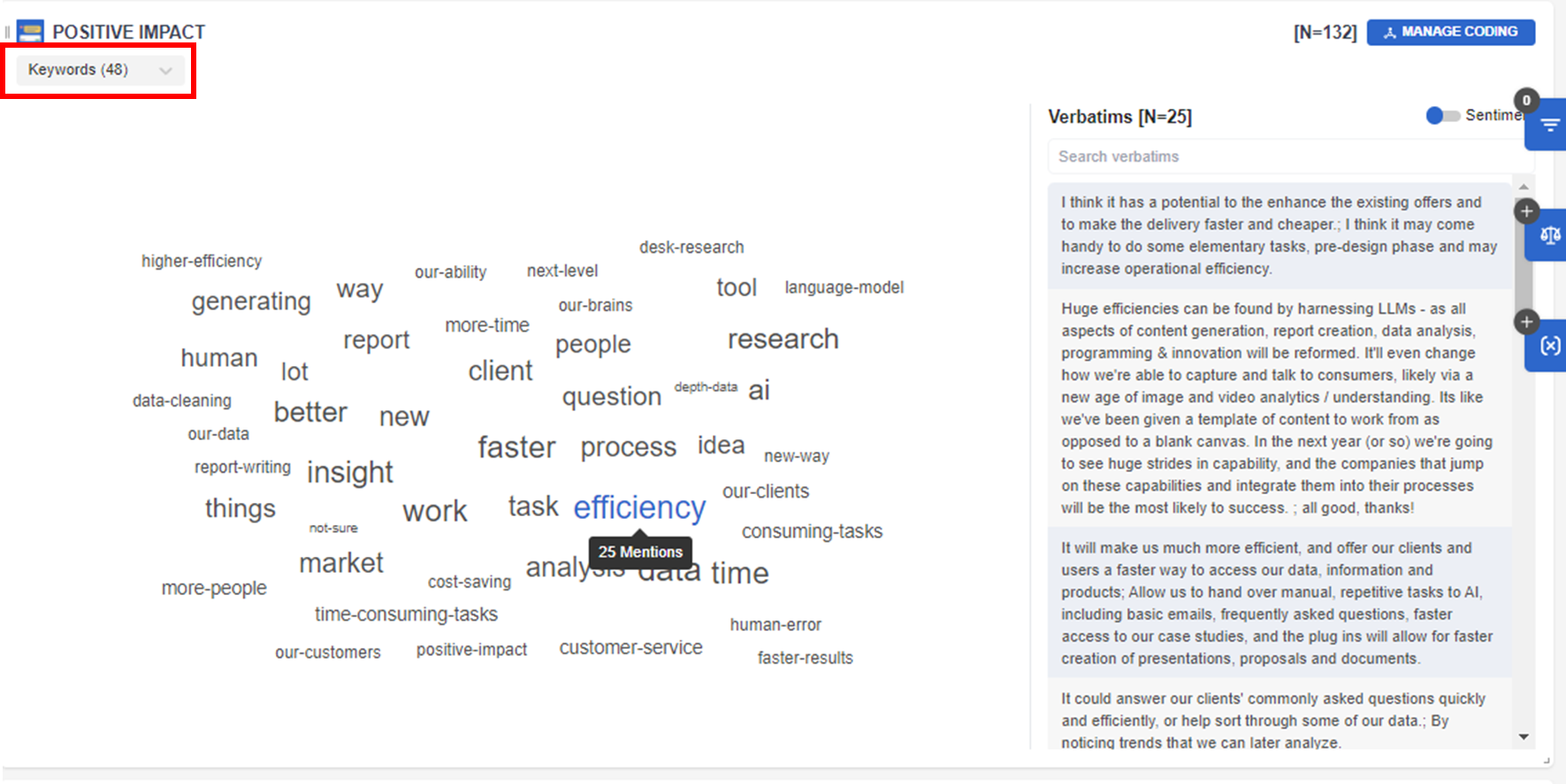
The Keywords model provides a visual presentation (word cloud) of the top mentions or keywords in the open-ended question. The bigger the word, the higher the mention. In this case, "efficiency" is highly mentioned by participants.
You can also click the word to filter the relevant verbatims that mention the word in the verbatim sidebar on the right.
Related Articles
How the data is analyzed and visualized for Tradeoff Ranking?
How Tradeoff Ranking works? Tradeoff Ranking is mainly used to test the attractiveness and competitiveness of different ideas, including concepts, messages, logos, features and other stimulus materials. It explores further why the customers like or ...How the data is analyzed and visualized for Loop Questions?
Looped Questions in Dashboard 1. Report Page Each question in the Loop has a visualization chart. Within each chart, a Loop drop down allows users to filter results by a specific loop. Example Visualization for Loop: Question based Example ...How the data is analyzed and visualized for Treeman Projective?
How does Treeman Projective work? Treeman is a Projective technique that elicits the emotions and feelings of participants on a particular topic. It is mainly a single-choice question and all the options add up to 100%. An open-ended question is then ...How the data is analyzed and visualized for Video Annotations?
How do Video Annotations work? Video Annotations are mainly used to test ideas and concepts in which the video stimulus can be evaluated scene by scene. Participants are asked to select and pause the scene in which they feel like, dislike, or are ...How the data is analyzed and visualized for Image Hotspot?
How does Image Hotspot work? Image Hotspot is mainly used to test images or ads/concepts that are a mixture of image and text. Participants are presented with an image with predefined regions to select from and choose whether they feel like, dislike ...