How the data is analyzed and visualized for Tradeoff Ranking?
How Tradeoff Ranking works?
Tradeoff Ranking is mainly used to test the attractiveness and competitiveness of different ideas, including concepts, messages, logos, features and other stimulus materials. It explores further why the customers like or dislike the ideas so that users can understand from their customers’ perspectives and iterate their ideas accordingly.
Tradeoff Ranking consists of three parts.
- The first part asks the participants to rate if they like or dislike the idea presented in a series of popup cards.
- The second part asks the participant to make head-to-head comparisons among the ideas that they liked in the first part until we identify the one that the person liked the most (i.e. the Top Choice).
- The third part includes two follow-up open-ended questions as to why they like or dislike the idea.
Please see more details about What is Tradeoff Ranking and how to set it up here.
How the data is analyzed and visualized for Tradeoff Ranking
On the dashboard REPORT PAGE, users can see a visualization like the following screenshot for Tradeoff Ranking.
The results displayed in the left section include the quantitative outputs from the first and second exercises of the Tradeoff Ranking question.
- Firstly, we show an Overall Score beside each idea (in this example the overall score is 24 for Tesla which is the highest from the list). The score is calculated based on both absolute liking from the first exercise and the competitive advantages from the second exercise. The score itself is unimportant, what we need to pay attention to is the ranking – highest to lowest – and the gap in scores between the ideas.
- In addition, we show a detailed chart including % of Top choices, Like, Not sure and Dislike for each idea.
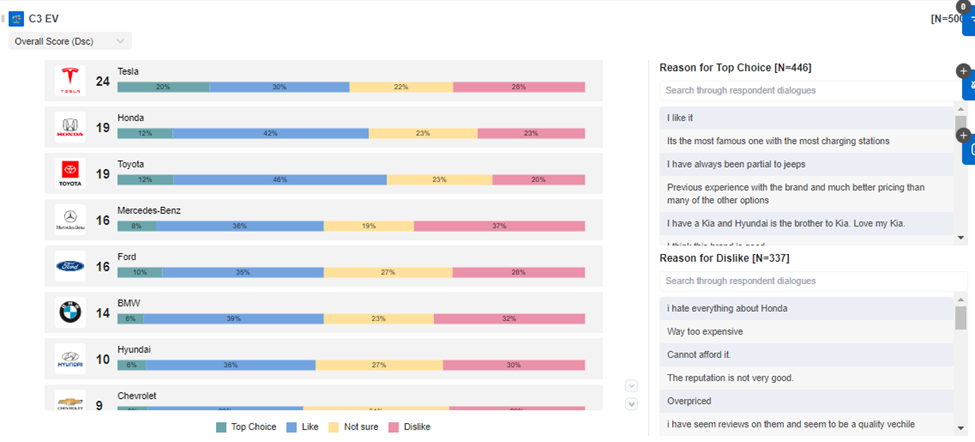
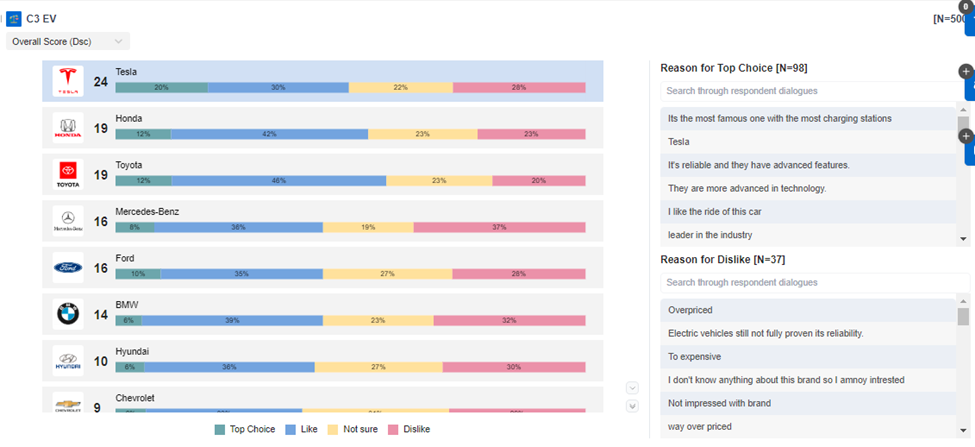
The section on the right includes detailed verbatim from the third part of the Tradeoff Ranking question. You may click on any idea to see the verbatim of why people like or dislike this idea. In the following example, we can see why people like or dislike Tesla after clicking Tesla.
Related Articles
How the data is analyzed and visualized for Video Annotations?
How do Video Annotations work? Video Annotations are mainly used to test ideas and concepts in which the video stimulus can be evaluated scene by scene. Participants are asked to select and pause the scene in which they feel like, dislike, or are ...How the data is analyzed and visualized for Treeman Projective?
How does Treeman Projective work? Treeman is a Projective technique that elicits the emotions and feelings of participants on a particular topic. It is mainly a single-choice question and all the options add up to 100%. An open-ended question is then ...How the data is analyzed and visualized for Image Hotspot?
How does Image Hotspot work? Image Hotspot is mainly used to test images or ads/concepts that are a mixture of image and text. Participants are presented with an image with predefined regions to select from and choose whether they feel like, dislike ...How the data is analyzed and visualized for Text Highlighter?
How does Text Highlighter work? Text Highlighter is mainly used to test ideas, concepts, messages, taglines, and slogans in which the text format stimulus material can be evaluated word by word, phrase by phrase, or by sentences. Participants are ...How the data is analyzed and visualized for Guided Fantasy Projective?
On the dashboard report page, the Guided Fantasy is analyzed and visualized with a Summary: Note: If users need coded results or Themes, users can export the verbatims of the Guided Fantasy question from the raw data file or copy the verbatims ...