Start a study from scratch or from a template
Once you've signed up and logged in to your account, you will be directed to the PROJECT DIRECTORY page. To create a new study, just click the +New Project button and you can either build a study from scratch or from a templated solution.
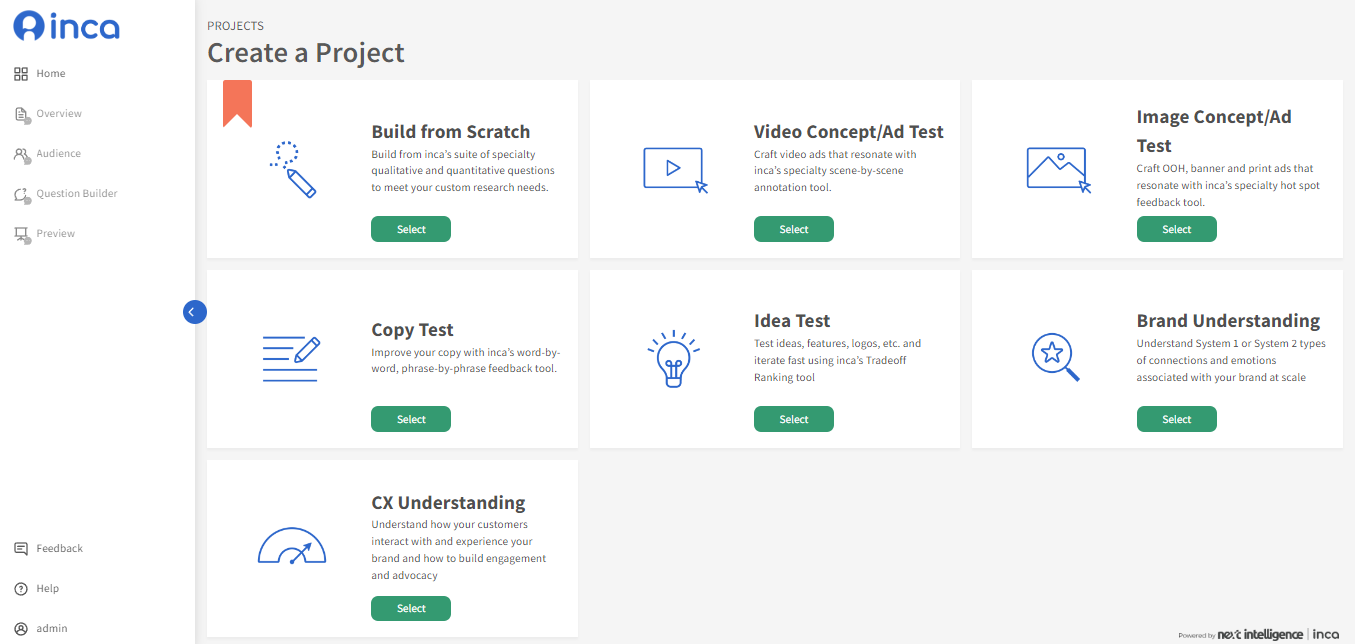
Build from Scratch
Build from inca’s suite of specialty qualitative and quantitative questions to meet your custom research needs. To learn more about the different QUESTION TYPES available on the platform, click here.
Templated Solutions
Video Concept/Ad Test- Craft video ads that resonate with inca’s specialty scene-by-scene annotation tool. Here's a quick video to show how Video Annotation works on the inca chatbot
Image Concept/Ad Test- Craft OOH, banner and print ads that resonate with inca’s specialty hotspot feedback tool. Here's a quick video to show how Image Hotspot tool works on the inca chatbot
Copy Test- Improve your copy with inca’s word-by-word, phrase-by-phrase feedback tool. Here's a quick video to show how Text Highlighter feedback tool works on the inca chatbot.
Idea Test- Test ideas, features, logos, etc. and iterate fast using inca’s Tradeoff Ranking tool. Here's a quick video to show how Tradeoff Ranking tool works on the inca chatbot.
Brand Understanding- Understand System 1 or System 2 types of connections and emotions associated with your brand at scale. Here's a quick video to show how Guided Fantasy Projective works on the inca chatbot
CX Understanding- Understand how your customers interact with and experience your brand and how to build engagement and advocacy. In this template, there are 3 specialty questions included: Trade-off Ranking, Treeman Projective and NPS Plus. (Click the question for more details).
Related Articles
Copy from a past study
The ability to copy from a past study can be very useful when you want to run a similar study as the previous one. Instead of creating the study from scratch again, you can duplicate the previous study and make any necessary changes based on that ...How can I upload my questionnaire file (Word or Excel) to the inca platform?
Once you've signed up and logged in to your account, you will be directed to the PROJECT DIRECTORY page. To create a new study, just click the +New Project button. Users can either build a study from scratch or upload from an existing questionnaire ...How to download data map (questionnaire)?
To download a data map or questionnaire for your study, you can do so by going to theProject Directory Page. Hover over to your project/study then click MORE and click Question & Option Export to download the questionnaire/data map (excel format).How to set up an Open Ended Question and optimize probing (inca SmartProbe Studio)
Main use: Using an open-ended question, participants can freely type answers in their own words (as opposed to a pre-determined list in Choice questions), which can be in lengthy essays or short texts. A. For inca platform users, you access inca ...What is Project-Level Conversational Settings and how to set it up?
In the Question Builder, users can control and apply the same Quality Control and Smartprobe settings for all Open End questions in their study. This can be done in the Overview page using the Conversational Settings tab. Once users enable the ...